



On Asynchronous Learning Days, students are responsible for logging into the Student Portal and marking themselves Present for the day. The steps listed below outline this process.
If you are not familiar with how to access and log in to the Focus Student Portal, please read the following knowledge base article.
1. Log in to the Focus Student Portal with your USCSD Single Sign-On username and password.
If you're using a Chromebook, launch the Chrome browser and click the uscstudents.org bookmarks item in the bookmarks bar. Click the bookmark titled Student Portal.
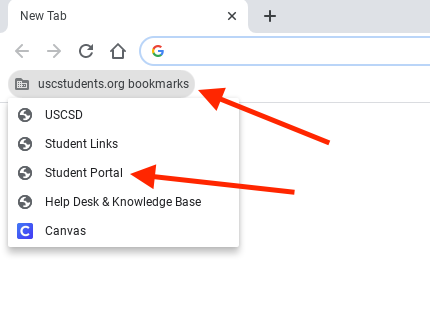
If you're using an iPad, tap the bookmark on your home screen titled Student Portal.

Click the button labeled Sign in with SSO.

If the school day is marked as a Flexible Instruction Day/Asynchronous Learning Day, you will see a Check-In section on the homepage with a large green button labeled I'm Present. Click or tap the I'm Present button to mark yourself present for the day.

Once you press the button, it will turn "grey". Once it turns grey, your attendance has been recorded for the day.


